
Keeping your Shark Ion vacuum clean is more important than most people realize. A well-maintained vacuum works better, lasts longer, and keeps your home healthier. But many Shark Ion vacuum owners aren’t sure exactly how to clean their machines, what tools to use, or how often each part needs care.
If you’ve ever wondered why your vacuum seems weaker or starts to smell, a deep clean might be the solution. In this guide, you’ll learn step-by-step how to clean every part of your Shark Ion vacuum, avoid common mistakes, and keep your device running like new.
Whether you’re a first-time owner or looking to prolong the life of your trusted vacuum, you’ll find practical tips and expert insights to make the cleaning process simple and effective.
Why Cleaning Your Shark Ion Vacuum Matters
A Shark Ion vacuum is a big investment for most households. Over time, dust, hair, and dirt can clog filters and block airflow. This doesn’t just hurt cleaning power—it can shorten the vacuum’s life and fill the air with allergens. Regular cleaning:
- Boosts suction power
- Prevents bad smells
- Reduces allergy triggers
- Extends the vacuum’s lifespan
- Stops clogs before they start
Neglecting maintenance often leads to expensive repairs or even early replacement. For allergy sufferers, a dirty vacuum can make symptoms worse. Clean machines work efficiently, saving you time and energy on your cleaning routine.
Understanding Your Shark Ion Vacuum
Before you start cleaning, it’s smart to know the main parts of your Shark Ion vacuum. Most models share a similar design, with a few differences between stick, handheld, and robot versions. Knowing the basic layout helps you clean each part thoroughly.
Main Components
- Dustbin: Where dirt collects during vacuuming
- Filters: Usually a foam/felt pre-motor filter and a HEPA or mesh post-motor filter
- Brush roll: Rotating brush that grabs dirt and hair from carpets
- Floor head/nozzle: Main cleaning head that contacts the floor
- Battery: Removable or built-in rechargeable battery (for cordless models)
- Wheels and sensors: Especially important for robot models
Check your user manual for diagrams or search the model number online for a breakdown. Most cleaning steps are similar across Ion models, but a few parts—like brush roll access or filter location—may vary.

Credit: www.amazon.com
Tools And Supplies You’ll Need
You don’t need fancy equipment to clean your Shark Ion vacuum, but having the right tools ready makes the job much easier. Gather these before you begin:
- Clean, dry microfiber cloths
- Soft brush (an old toothbrush works well)
- Mild dish soap
- Warm water
- Scissors or seam ripper (for hair on brush roll)
- Small screwdriver (for some models)
- Compressed air can (optional, for dust in tight spots)
- Replacement filters (if your current ones are worn out)
- Disposable gloves (recommended for allergy sufferers)
- A bowl or small bucket
Using harsh chemicals or soaking electronic parts is a common mistake—stick to gentle cleaners and follow your model’s care instructions.
Safety First: Preparing Your Vacuum For Cleaning
Always put safety first before taking your vacuum apart. Here’s what to do:
- Turn off the vacuum and unplug it (if it’s corded).
- For cordless models, remove the battery if possible.
- Empty the dustbin to avoid mess.
- Work in a well-lit area, preferably near a sink or trash bin.
Never clean your vacuum while it’s powered or plugged in. Even small batteries can cause shocks or short circuits when exposed to water.
Step-by-step Guide: Cleaning The Shark Ion Vacuum
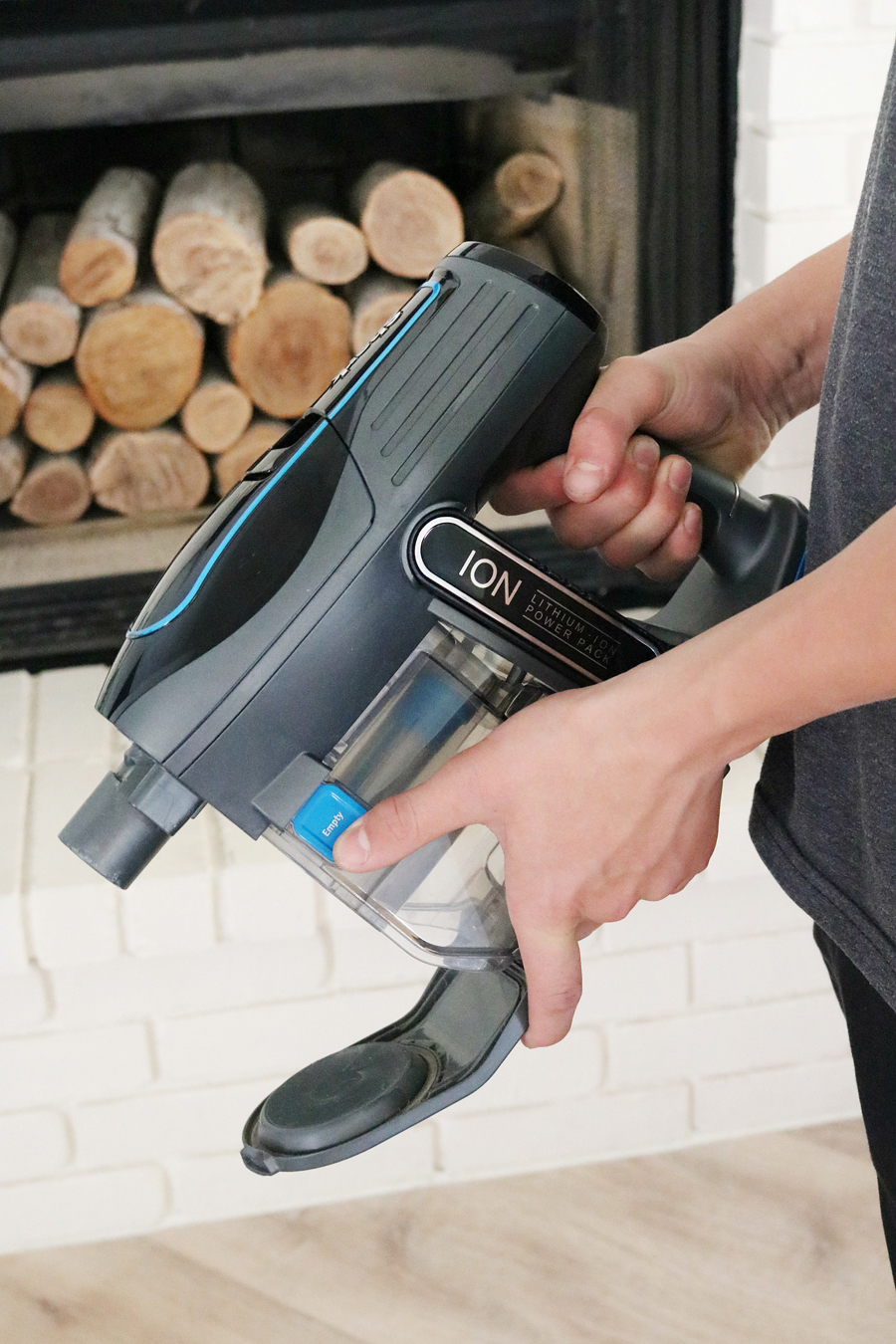
Now, let’s get into the details of cleaning each part. Follow these steps in order for the best results.
1. Empty And Clean The Dustbin
The dustbin is where most dirt collects. If left full, it can block suction and cause odors.
- Remove the dustbin by pressing the release button (location varies by model).
- Hold it over a trash bin and empty all debris.
- Wash the dustbin with warm, soapy water. Use a brush to scrub corners.
- Rinse well and let it air dry completely before reattaching.
Pro tip: Never put a wet dustbin back in the vacuum. Moisture can damage the motor or cause mold.
2. Clean Or Replace The Filters
Filters protect your vacuum’s motor and trap dust. Dirty filters are the #1 cause of weak suction.
Cleaning The Pre-motor Filter
- Locate the foam or felt filter (usually behind the dustbin).
- Remove the filter gently.
- Rinse under cold water until the water runs clear. Don’t use soap, as it can damage filter fibers.
- Squeeze out excess water.
- Let the filter air dry for at least 24 hours. Do not use a hairdryer or heater.
Cleaning Or Replacing The Post-motor/hepa Filter
- Some Shark Ion models have a HEPA or mesh filter after the motor.
- Remove the filter according to the manual.
- Tap gently over a trash can to remove dust.
- Rinse if washable (check your manual—some HEPA filters are not washable).
- Let dry completely before reinstalling.
- Replace the filter if it’s damaged, smelly, or over a year old.
Filter Cleaning Frequency
| Filter Type | Cleaning Frequency | Replacement Interval |
|---|---|---|
| Foam/Felt Pre-Motor | Every 1-2 months | Every 6-12 months |
| HEPA/Post-Motor | Every 3 months | Every 12-18 months |
Non-obvious tip: If you have pets or allergies, clean filters more often.
3. Clean The Brush Roll
The brush roll is where hair, strings, and fibers often get tangled. A dirty brush roll leads to poor carpet cleaning and can burn out the motor.
- Lay the vacuum down and locate the brush roll cover.
- On many models, you can unlock the cover without tools. Some need a small screwdriver.
- Remove the brush roll carefully.
- Use scissors or a seam ripper to cut away hair and threads. Pull debris off by hand.
- Wipe the brush roll with a damp cloth. If needed, use mild soapy water, but make sure to dry it fully before reinstalling.
- Check the ends of the brush roll for wrapped hair or debris—these can stop it from spinning.
Extra insight: Many users forget to check the brush roll bearings (the part where the roll connects to the vacuum). If these get clogged, the brush will not spin smoothly.
4. Clean The Floor Nozzle And Wheels
Dirt can build up inside the floor head and around the wheels, making it hard to push the vacuum.
- Wipe the inside of the nozzle with a damp cloth.
- Remove any visible debris from the air pathways.
- Spin the wheels and clean any hair or lint stuck around them.
- For robot models, check and clean sensors using a soft, dry cloth.
Pro tip: Compressed air helps blow dust out of small crevices.
5. Check And Clean The Hose
A blocked hose is a common reason for weak suction. Here’s how to clean it:
- Detach the hose from the vacuum (if your model allows).
- Hold the hose up and look through it against the light.
- If blocked, push a broomstick or a flexible cleaning brush through to remove debris.
- Rinse the hose with warm water. Let it dry fully before reattaching.
6. Wipe The Exterior And Controls
Finish by cleaning the outside:
- Wipe the vacuum’s body, handle, and buttons with a damp microfiber cloth.
- Avoid getting water into electrical parts or charging ports.
Non-obvious insight: Dust around buttons or sensors can sometimes cause controls to stick or not work properly.
7. Clean The Battery Contacts (cordless Models)
Dirty battery contacts can prevent your vacuum from charging well.
- Remove the battery (if possible).
- Wipe the metal contacts with a dry cloth or a cotton swab.
- Do not use water or cleaners.
If the battery is not removable, just make sure the charging port is dust-free.
How Often Should You Clean Your Shark Ion Vacuum?
Regular cleaning keeps your vacuum in top shape. But how often is enough? Here’s a simple schedule:
- Dustbin: After every use
- Filters: Every 1-2 months (more often for allergy homes)
- Brush roll: Every 2-4 weeks, or sooner if you have pets
- Hose and nozzle: Every 1-2 months
- Wheels and sensors: Monthly (robot models: every 1-2 weeks)
- Battery contacts: Every 2-3 months
Following this routine helps avoid surprise breakdowns and keeps your vacuum’s suction strong.
Troubleshooting: What If Your Vacuum Still Isn’t Working Well?
Even after cleaning, some Shark Ion vacuums may not perform as expected. Here are common issues and solutions:
- Weak suction: Double-check that all filters are dry and properly installed. Inspect for hidden clogs in the hose, brush roll, and air pathways.
- Brush roll not spinning: Make sure the brush roll is seated correctly and free of debris at the ends. Some models have a reset switch—check your manual.
- Vacuum won’t turn on: For cordless models, check if the battery is charged and seated well. For corded models, check the power outlet and cord.
- Strange noises or smells: This usually means something is stuck inside or the filters are overdue for cleaning or replacement.
If you’ve tried all cleaning steps and still have problems, contact Shark customer support or visit their official support site for guidance.
Mistakes To Avoid When Cleaning Your Shark Ion Vacuum
Some cleaning habits can actually damage your vacuum. Watch out for these common mistakes:
- Reassembling parts before they’re dry: Moisture can cause mold or harm the motor.
- Using harsh chemicals: Stick to mild soap and water. Strong cleaners can damage filters and plastic parts.
- Forcing parts back together: If something doesn’t fit, check for debris or look at the manual—never force it.
- Skipping filter maintenance: Dirty filters are the main reason for weak suction and overheating.
- Ignoring battery care: For cordless vacuums, never clean with the battery attached or wet the charging contacts.
How Cleaning Improves Air Quality And Health
A clean vacuum does more than just pick up dirt—it helps keep your home’s air healthier. Dirty vacuums can recirculate dust mites, pollen, and bacteria back into your home. For people with asthma or allergies, this can make symptoms worse.
Regular cleaning:
- Reduces indoor allergens
- Prevents mold growth in filters and hoses
- Stops bad smells caused by trapped debris
- Keeps dust from spreading during vacuuming
According to the Environmental Protection Agency, indoor air can be two to five times more polluted than outdoor air. Keeping your vacuum clean is a simple but powerful way to reduce that risk.
Comparing Shark Ion Vacuum Cleaning With Other Brands
How does the cleaning process for Shark Ion compare to other popular vacuum brands? Here’s a quick look at cleaning frequency and filter care for Shark Ion versus Dyson and Roomba.
| Brand | Filter Cleaning | Brush Roll Maintenance | Unique Features |
|---|---|---|---|
| Shark Ion | Every 1-2 months (foam/felt), every 3 months (HEPA) | Every 2-4 weeks | Washable filters, easy access brush roll |
| Dyson V-Series | Monthly (HEPA only) | Monthly | Single washable filter, tool-free brush roll removal |
| iRobot Roomba | Monthly (HEPA) | Every 1-2 weeks | Self-cleaning base on some models |
Non-obvious insight: Shark Ion vacuums are known for their washable filters, which can save money over time compared to brands that require more frequent replacements.
Tips To Keep Your Shark Ion Vacuum Cleaner For Longer
A little prevention can reduce how often you need deep cleaning. Try these tips:
- Vacuum high-traffic areas more often to avoid heavy dirt buildup.
- Pick up large debris by hand before vacuuming to avoid clogging.
- Brush pets regularly if you have animals—less shedding means less hair in the brush roll.
- Store your vacuum in a clean, dry place to avoid dust buildup and moisture damage.
- Charge the battery only when needed to extend its life (for cordless models).
If you notice a drop in performance, check filters and the dustbin first—these are the most common trouble spots.
Real-life Example: How Regular Cleaning Saved A Vacuum
A Shark Ion F80 owner named Sarah noticed her vacuum was losing power and making strange noises. Instead of buying a new one, she followed a full cleaning routine—emptying the dustbin, washing filters, cleaning the brush roll, and clearing the hose.
She found a hidden clog in the hose and a thick layer of dust on the filter. After drying and reassembling, her vacuum worked like new. Sarah saved over $150 by avoiding a service call or replacement.
Lesson: Most vacuum problems can be fixed with proper cleaning—don’t rush to replace your device!
When To Replace Parts On Your Shark Ion Vacuum
Even with regular cleaning, some parts wear out. Here’s when to consider replacements:
- Filters: If they look torn, misshapen, or still smell after cleaning.
- Brush roll: If bristles are missing or bent, or if it rattles while spinning.
- Hose: If there are holes, cracks, or stubborn blockages.
- Battery: If it holds a charge for much less time than it used to.
Always use genuine Shark parts for best results.
How To Deep Clean For Allergies Or Pet Owners
If you have allergies, pets, or small children, a deeper cleaning routine is wise:
- Clean filters and brush roll every month.
- Wipe down the vacuum’s body and handle after each use.
- Use gloves when cleaning to avoid direct contact with allergens.
- Consider replacing filters more often (every 3-6 months).
A clean vacuum reduces dander, pollen, and dust in your home, making it safer for everyone.
What To Do If You Lose Suction Suddenly
Sudden loss of suction usually means a blockage. Here’s a quick troubleshooting checklist:
- Empty the dustbin fully.
- Check all filters—wash or replace if dirty.
- Inspect the hose for clogs.
- Look for debris in the floor nozzle or brush roll.
- Make sure all parts are dry and correctly assembled.
If the problem continues, check for cracks or leaks in the hose and seals.
Table: Signs Your Shark Ion Needs Cleaning
Here’s a simple guide to know when it’s time to clean:
| Sign | Possible Cause |
|---|---|
| Weak suction | Clogged filters, full dustbin, blocked hose |
| Bad smell | Dirty filters, trapped debris in brush roll |
| Brush roll stops spinning | Hair wrapped around brush, blocked bearings |
| Unusual noise | Debris in brush roll or nozzle |
| Vacuum won’t charge | Dirty battery contacts or charging port |
Frequently Asked Questions
How Often Should I Clean The Filters In My Shark Ion Vacuum?
It’s best to clean the foam and felt filters every 1-2 months, and the HEPA filter every 3 months. If you have pets or allergies, clean them more often. Always let filters dry completely before reinstalling.
Can I Wash The Hepa Filter In My Shark Ion Vacuum?
Some Shark Ion HEPA filters are washable, but not all. Check your user manual. If yours is washable, rinse under cold water without soap and let it air dry fully. If not, tap out dust and replace the filter as needed.
My Brush Roll Is Tangled With Hair. What’s The Safest Way To Clean It?
Turn off and unplug the vacuum. Remove the brush roll. Use scissors or a seam ripper to carefully cut and pull away hair and threads. Avoid damaging the bristles. Wipe the brush roll clean before putting it back.
Why Does My Shark Ion Vacuum Smell Bad After Cleaning?
Bad smells usually mean a part is still dirty or not fully dry. Double-check the filters, dustbin, and brush roll. If the smell remains, try replacing the filters and cleaning the hose. Always let all parts dry fully before reassembling.
What Should I Do If My Shark Ion Vacuum Loses Suction After Cleaning?
First, make sure all parts are dry and properly reattached. Check for hidden blockages in the hose, filters, and brush roll. If you still have problems, inspect for cracks or air leaks. Regular cleaning usually solves most suction issues.
A clean Shark Ion vacuum is your best friend for a healthy, dust-free home. With the right routine, you’ll enjoy stronger suction, fewer repairs, and fresh, clean floors every time. Happy cleaning!

Brandy A. Cherney lovingly refers to herself as a cleaning geek, born and bred in South Carolina but moved to New York City to earn her B.A. in English. She is currently a wife, and mother of two children, two cats, and a dog. Brandy has always loved writing, but never thought she would write for a living.